Free Monthly Budget Template (Google Sheets)
A free monthly budget template for Google Sheets. Get it for $0 on Gumroad with just your email (no credit card), then make your own copy. Budget vs. actual, bills, debt and savings goals add up on their own.
What is this free monthly budget template?
It’s a free Google Sheets budget for one month at a time. You type your income, what you planned to spend and what you actually spent, plus your savings, debts and bills. The sheet adds it all up and shows your leftover money and savings rate. A filled-in Example tab and a How to Use tab come with it. It costs $0.
| Price | $0. Pay what you want, and $0 is fine |
|---|---|
| Format | Google Sheets, with every formula already built |
| Tabs | 3: Money Tracker (your month), Example (a filled-in month), How to Use |
| Sections | Income, expenses (budget vs. actual), savings, debt, savings goals, bills |
| Room for | 9 income sources, 17 expense categories, 8 savings lines, 7 debts, 7 goals, 10 bills |
| Fills in by itself | Total income, expenses and saved, leftover, over/under, savings rate |
| Works on | Desktop, tablet and phone with a free Google account |
| To get it | Gumroad asks for your email to send the link; no credit card |
Take a look inside
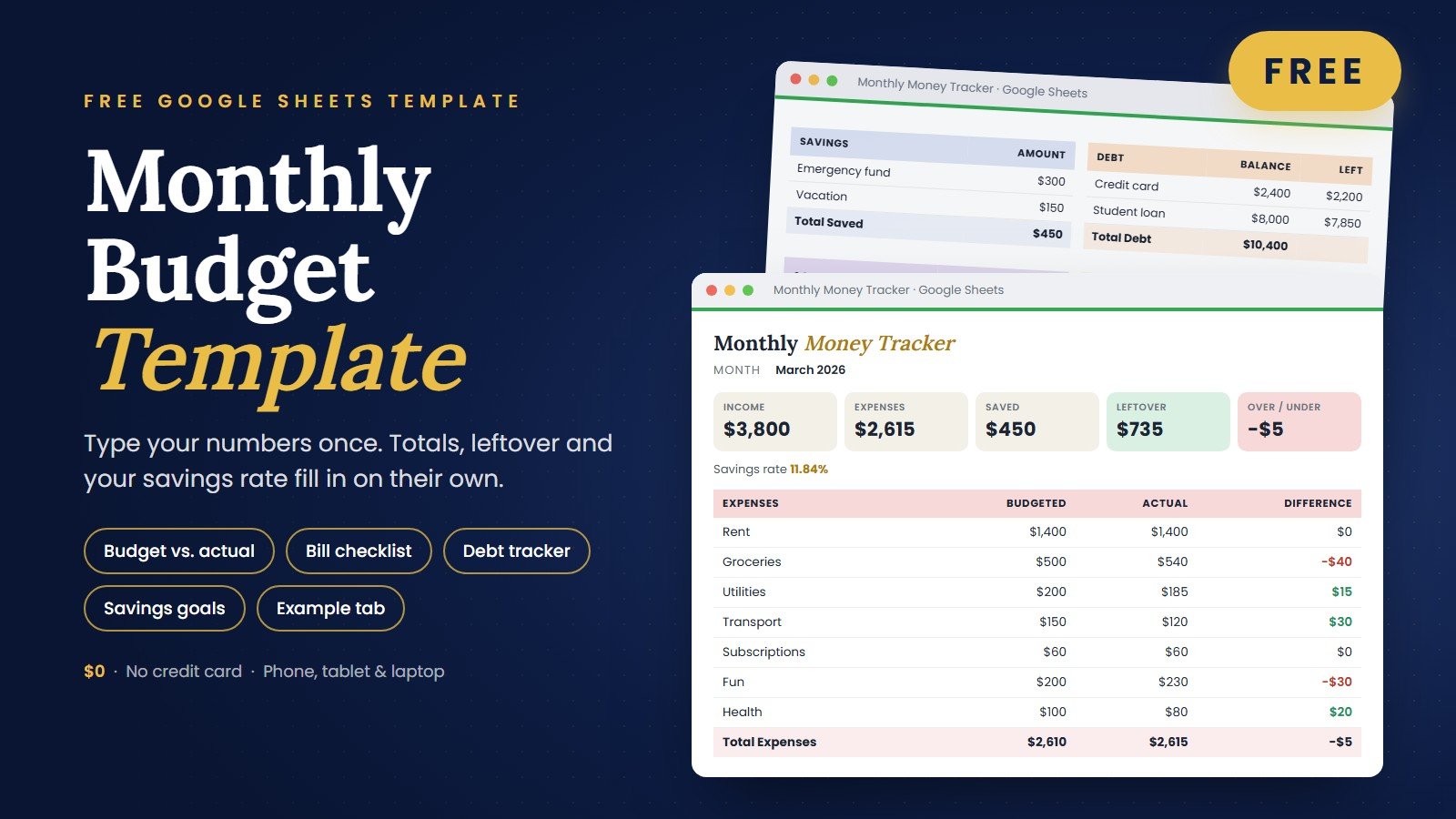
The actual spreadsheet you’ll get — here’s how it works.
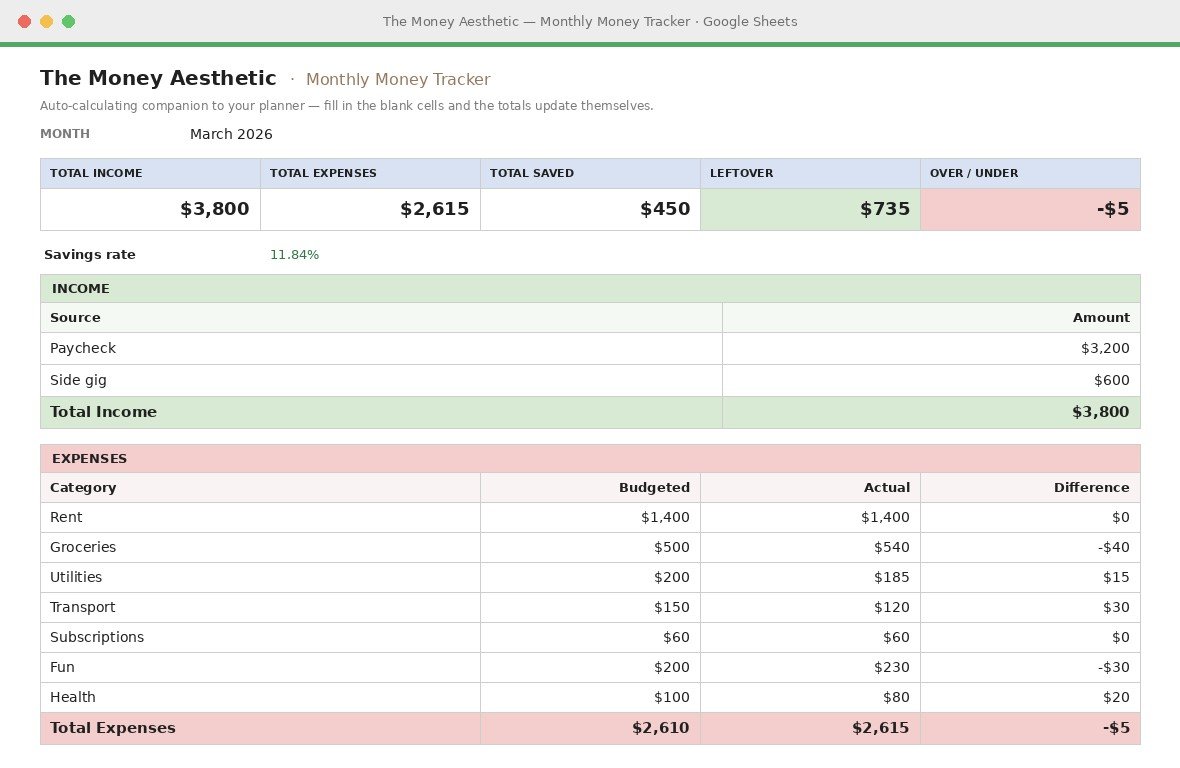
Your whole month on one page
Type your income and expenses into the blank cells — totals, leftover and your savings rate calculate themselves. The expense table even compares what you budgeted against what you actually spent.
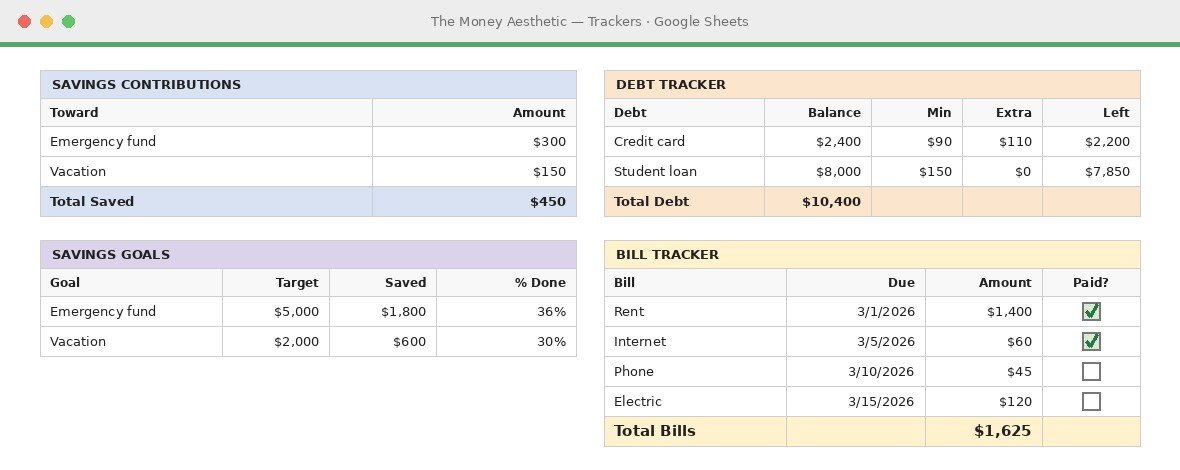
Track it all in one place
Log savings contributions, follow your debt payoff, set savings goals with a live % complete, and tick off bills as you pay them. Every section adds itself up automatically.
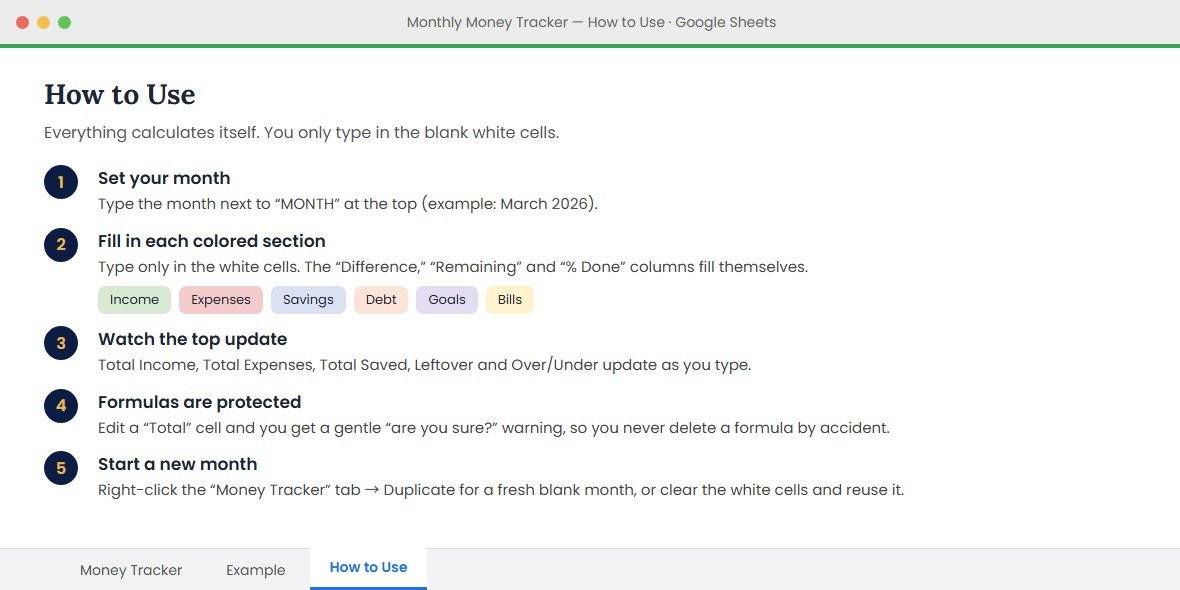
Never stare at a blank sheet
The Example tab shows a whole month already filled in, so you can see how every section looks before you start. The How to Use tab walks you through it in five short steps. The total cells show a warning before you edit them, so you won’t erase a formula by accident.
What’s inside
Everything you need to run your month — nothing you don’t.
Auto-calculating
Type your numbers; totals, balances and savings update themselves.
Budget vs. actual
See what you planned next to what you really spent, by category.
Debt payoff tracker
Track balances, minimums and extra payments until you’re free.
Savings goals
Set a target and watch your percentage climb every month.
Bill checklist
Tick off bills as you pay so nothing slips through the cracks.
Free updates
Every future improvement to the template is yours, free.
How it works
Get it free
Click the button — checkout takes one click on Gumroad.
Make a copy
Open the link and choose “Make a copy” to your Google Drive.
Fill it in
Enter your income and expenses — the sheet does the math.
Every section, explained
You type in the white cells. Everything in the last column fills in on its own.
| Section | What you type | What fills in by itself |
|---|---|---|
| Monthly snapshot | The month (pick it from a calendar) | Total income, total expenses, total saved, leftover, over/under, savings rate |
| Income · 9 rows | Each paycheck or side income and its amount | Total income |
| Expenses · 17 rows | Your own category names, what you budgeted, what you actually spent | The difference on every line, plus budgeted and actual totals |
| Savings · 8 rows | What you’re saving toward and how much | Total saved |
| Debt · 7 rows | Each debt’s balance, minimum payment and any extra payment | What’s left after this month’s payments, total debt |
| Savings goals · 7 rows | Goal, target amount, saved so far | Amount remaining and % done |
| Bills · 10 rows | Bill, due date (calendar picker), amount, a Paid? checkbox | Total bills |
How the top boxes work: Leftover = total income − actual expenses − total saved. Over/Under = what you budgeted minus what you actually spent, so a minus number means you went over.
A simple monthly routine
One simple way to use it. Change it to fit your life.
Day 1: start the month
Duplicate your blank Money Tracker tab, name the copy for the month, and type your budget for each category.
Every week: catch up
Add paychecks as they land, update what you actually spent, and tick the bills you’ve paid.
Month end: look back
Check Over/Under, then move what’s left to a savings goal or an extra debt payment.
Free vs. PRO: which one do you need?
Start free. Move up when you want a dashboard, an expense log and a plan to get out of debt.
| Monthly Budget Template Free | Budget by Paycheck Spreadsheet PRO · $6.99 | |
|---|---|---|
| Format | Google Sheets | Google Sheets |
| Price | $0 | $6.99 one-time, no subscription |
| Monthly totals & leftover | ✓ Top summary boxes | ✓ Live dashboard with charts |
| Spending by category | ✓ Budget vs. actual for each category | ✓ Expense tracker with live category totals |
| Pay schedule | — Monthly income only | ✓ Weekly, biweekly or semi-monthly pay converted to a monthly budget |
| Debt payoff | ✓ Balance, payments, what’s left | ✓ Snowball and avalanche compared, with months to debt-free |
| Savings | ✓ Goals with % done | ✓ Savings tracker with goal progress bars |
| Bills | ✓ Checklist with due dates | ✓ Bill calendar |
The PRO sheet turns weekly or biweekly pay into a monthly budget, shows what’s left after your bills, logs spending by category, and compares snowball vs. avalanche so you see how many months until you’re debt-free.
What budgeters are saying
★★★★★ from people who finally stuck with a budget
“Finally a budget I didn’t abandon by week two. It’s just… calm. I open it every Sunday now.”
“Three months in and I’ve saved $740 I’d normally have no clue about. That ‘leftover’ number at the top keeps me honest.”
“I am NOT a spreadsheet person, but it was set up in five minutes and everything calculates itself. Zero stress.”
“Works perfectly on my phone in Google Sheets — I update it on the train home. Tiny thing, huge difference.”
“It’s genuinely pretty?! I look forward to my Sunday money date now instead of dreading it.”
“Was sure ‘free’ meant useless. It replaced the $80/year app I was paying for. Wild.”
“My partner and I finally use the same budget. The shared dashboard ended so many money arguments.”
“Savings and debt trackers side by side keep me going — down $2,100 since I started. Can’t recommend enough.”
FAQ
Is it really free?
Yes — the Monthly Budget Template is completely free. Click “Get it free,” and it’s yours instantly through Gumroad. No credit card needed.
How do I get it after checkout?
Gumroad gives you an instant PDF with the link to the Google Sheet. Open the link and choose “Make a copy” to save your own editable version to Google Drive.
What do I need to use it?
A free Google account. It runs in Google Sheets in your browser or the app — no Excel or install required.
Can I use it on my phone?
Yes. It works in the Google Sheets mobile app, so you can update your budget anywhere.
Do I get future updates?
Yes — any improvements to the template are yours for free, forever.
Do I need to enter my email?
Yes. Checkout runs through Gumroad, which asks for your email so it can send your download link. No credit card is needed when you pay $0.
Can I use it every month?
Yes. Before you fill it in, right-click the blank Money Tracker tab and choose Duplicate, so you always keep a clean copy to start each new month from. Keep one tab per month so you can look back, or clear the white cells and reuse a tab.
Can I change the categories?
Yes. The expense category names are yours to type, with room for 17 of them. The Example tab shows seven common ones (rent, groceries, utilities, transport, subscriptions, fun and health) to get you started.
Does it work in Excel?
It opens in Excel, but it’s designed for Google Sheets. The calendar date pickers and checkboxes only work in Google Sheets, which is free.
Can I share it with my partner?
Yes. Click Share in your own copy and add their email. You’ll both see the same numbers, on a laptop or in the Google Sheets app.
What’s the difference between this and the paid version?
This free template tracks one month at a time. The Budget by Paycheck Spreadsheet ($6.99, also Google Sheets) adds a dashboard with charts, an expense tracker with live category totals, a bill calendar, a snowball vs. avalanche comparison that shows how many months until you’re debt-free, and converts weekly or biweekly pay into a monthly budget.
More money templates
You might also like these.